


If a person played the N64 back in the day, chances are they logged about a billion hours between Goldeneye and Mario Kart. I was finishing up high school just as the N64 was taking off, and my buddies and I were no exception to the Nintendo 64 craze. Heck, given the number of hours in which we brutalized each other with banana peels and proximity mines, you could argue that we actually loved the N64 to death: literally.
The Flaw
The N64 was a fantastic system; however, it had one fatal flaw: the controller. Specifically, the first-party controllers that Nintendo supplied had the wimpiest joystick on the market. As a person used the joystick, the axis inside would literally wear away. The more it wore, the harder you had to push the joystick, which, in turn, wore down the joystick even faster. The only joystick that I can think of with such a huge failure rate is the Atari 5200’s. What’s strange is that during the time of the N64, Sega Saturn’s “3D” joystick was a pretty good item. Maybe Nintendo was afraid of seeming too much like Sega. For whatever reason they chose the design they did, we know the end of the story: joystick failure.
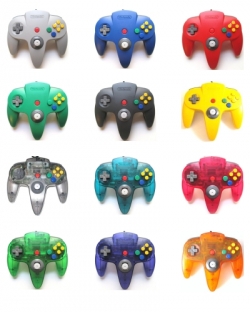
Nintendo’s Joystick Fix?
What was Nintendo’s solution to this issue? They issued controllers in every color under the sun. Heck, if kids got their parents to buy more controllers, then it would prolong the life of the joysticks that the kids already had. And of course, the argument could be made that there were great 4-players games for the N64. Thus, the additional purchases made sense. Or at least it made sense if you weren’t the fourth kid to show up for a session of Bond. Yup, being the last to arrive meant you got stuck with that horrid failure of a thumbstick that everyone else rejected.
Repair Ideas
We kids were quick to learn to pull apart our controllers to swap the better joysticks into the cooler controllers. That’s why you’ll see so many mismatched controller casings. But this process of cannibalizing controllers certainly wasn’t a solution.
I fix up a ton of games and systems, but for the longest time I was stumped by the issue of Nintendo 64 joysticks. I watched a bunch of YouTube videos and scanned forums for repair tips. Some people suggested repairs using layers of Scotch tape. Others had complicated tricks for transplanting joysticks from other non-N64 controllers and then essentially hiring an electrical engineer buddy to make the two compatible. I’d even experimented with a process of resurfacing the worn parts with surfboard resin or clear fingernail polish, but neither of these seemed to work well.
Repair Solution
Finally, I found a good supplier for a quality joystick. We’ve started to carry that joystick, and I have to say that the case is now closed on the issue. The replacement joystick feels much more like the Game Cube or Dreamcast’s joysticks, and I honestly wish Nintendo had started with these in the first place.
The “how to” tutorial video below demonstrates the installation of these joysticks, and it’s pretty straight forward. All you need is a Philips-head screwdriver, about 5-10 minutes of time, and a little patience. No soldering is involved in this installation process, and once everything is unscrewed, you’ll literally unplug the old joystick and plug in the new one.
Feel free to contact us with any questions by commenting below or buy using our contact page.
Interested in purchasing a replacement N64 joystick? Check Amazon
Credits: Above photo “N64-Controller-Colors.jpg” used with permission of www.squidoo.com/controller-for-n64


 My 1st Favorite: WD-40 Let’s face it, what can’t WD-40 do?! I love this stuff. I spray a little into the cap of the WD-40 can, lightly moisten a Q-tip, rub the contacts, and magic happens. Using this method, I’ve been able to clean all but a few of the most stubborn video game cartridges.

 My 4th Favorite: Copper/Brass Cleaner Now and then you’ll see people on eBay advertise their games as “polished.” Often, they say they have a “secret” method. Chances are it’s simply their favorite brand of brass or copper polish. The stuff does a fantastic job cleaning game contacts, but generally you’ll have to open the game to use this method. Thus, it’s quite a bit more labor intensive than other methods.

 . He’s had great success cleaning games with these, and they post a fairly low risk of harming your games. Great suggestion Rudy!
 . He opens the game and cleans it without ever needing to use a solvent. He swears by it since many people use them to clean circuit boards, but it’s a bit too time intensive for my taste.